Hacker Newsnew | past | comments | ask | show | jobs | submitlogin
Ask HN: What is your (AI) dev tech stack / workflow?
93 points by dv35z 4 hours ago | hide | past | favorite | 82 comments
Hello, happy Friday!

I am looking to do some in-person "developer boot-up" workshops, and seek your suggestions for "modern tooling".

The background of the participants range from motivated newbie ("I heard you can make your own app with AI!") to existing software developers who want to get up to speed on modern development for the purposes of building stuff, and getting jobs where AI tools are being used.

For those who have been doing software development & "tech" lately using AI tools, and feel they have a great setup & flow - I would love to hear what your dev setup is, what tools you're using and what workflow has been working best for you (and your team).

// My Background

I have been programming / building for 20+ years, but have not been using AI tools much (aside from hitting up LLM APIs on a few projects).

I value open-source, and aim for long-term quality and supportability. Techniques like test-driven development (TDD), using proven / well documented tools, customer-centric development (often pairing with clients), make it easy to do the right thing. If you are familiar with Pivotal Labs, agile & XP - that's the style.

These are some of the Upcoming uses-cases for the workshop, and my own personal "IT backlog":

- Create a static "one pager" personal/professional website

- Setup a Blog / Static site generator (Pelican), create a simple but stylish theme

- Create a simple web app / backend API (FastAPI) tool - form-based calculator, convert X data to PDFs, etc.

- Figure out how to have SyncThing autosync the home folder of 3 Linux computers in the house

- Backup & archive the photos & video from my iPhone

// Tech stack I am currently using:

- Operating system: Linux Mint Debian (LMDE)

- Editor: VSCodium

- Code: Python, HTML/CSS

- Server platform: Amazon AWS

I am guessing that most workshop participants will be using MacBooks & Windows computers - but a few are on Linux, as I recently did a "Linux install party".

I haven't used any "AI harnesses", agents or anything like that - but curious what's a good starting point to take best advantage of these tools.

Thanks for sharing the knowledge!

// JRO

 help


I am using Spec Driven Development approach implemented as a Claude Code plugin since Feb for all mid + size tasks. The idea is to write detailed specs first using agent help doing research and interviewing, decompose the task into smaller subtasks, write detailed spec for each task, implement each task separately. You can restart the session after every step in the workflow and after each subtask implementation since all requirements are materialized in specs. This helps to keep session context focused on a single task at time, improve adherence, reduce cost and allow to implement bigger tasks that are hard to implement with pure plan + code.

Discussion on hn: https://news.ycombinator.com/item?id=48231575

Repo: https://github.com/sermakarevich/sddw

Slides: https://docs.google.com/presentation/d/1SjKXF7hkoqyiN9-3tBGY...


Genuine question, I'm trying to adopt specs and AI DLC in my team so we can use it as an enhancement and improve our development and the biggest pain right now for us is managing all those md artifacts.

I'm curious how do you manage them? Do you preserve them for the future or delete as soon as task was accomplished? If you're deleting those artifacts after job being done - do you summarize those specs into the Jira ticket or whatever system you use.


Similar with a todo.md in the project which outlines work to be done.. this gets combined with developer and/or user documentation which outlines features and how they're expected to work. I'll iterate with the agent on the planning and documentation through several times until the documentation and plan look good. The only gotcha I've had a couple times is I'll have the testing and spec before implementation and sometimes the agent will try to edit tests rather than making the implementation match spec/tests.

I'm definitely baby sitting the process more than vibe coding, and review each cycle's results. As for languages, mostly TS/JS and Rust with a bit of C# here and there depending on what I need. Claude Code's Opus does a pretty good job with Rust, so for anything personal, I've just gone with it.

Work has been limited to working out specific problems, or a small utility/library that I can pull in, but on my own system, separate from work resources.


One additional benefit that we get from the sddw is that agent drives the spec creation using scenario we put into command/skill. It does the research local/web, it asks operator questions and later confirmations about each block in the spec.

Naive question: how much time do you spend doing so vs. Doing the actual work yourself?

I am building AI agents full time since Nov 2024. I stopped coding completely around mid summer 2025 using Cursor at that time. When you build platform-like application, and have few plugins already, ai coder can create next one in a way you won't recognize which one is written by you.

At the end of 2025 I switched to Claude Code. Compared to Cursor this opened a different level of automation, including fe possibility of running swarms of agents: https://news.ycombinator.com/item?id=48407998 using subscription limits.

So I spend all my time rather understanding how to squeeze everything possible from AI than myself. AI scales, I am not.


I've shifted to a "slow code" approach with AI, treating it more like a design partner than a code generator.

I mostly do TDD with TypeScript. I write the test, write the code myself (sometimes with the help of LLM), and then hand it to the LLM. Instead of asking it to write things for me, I use it to find edge cases, check if it's leak-proof, and verify efficiency.

For architecture questions, I debate with it for a while. I almost never ask for code without conversing 4-5 times first to push back on its assumptions. It's the best rubber-ducking partner I've had.

Personal plug: I wrote more about why/how I use AI to write slow, better code on my blog: https://nabraj.com/blog/ai-write-slow-better-code


I've dabbled a bit in GitHub Copilot using Claude Opus and Sonnet models via work, but I couldn't shake the thought that we weren't allowed to use this on any of our clients' codebases. Having been a fan of Ollama, I wanted to try something truly local.

First I tried OpenCode but they unexpectedly make external requests (!) even when using Ollama (I noticed when Ollama wasn't properly connected and I still got a title generated).

So I settled for Pi, but I strongly disliked the idea that the agent could, at any point, decide to delete files or exfiltrate .env secrets. So I created Picosa (https://github.com/GreenpantsDeveloper/Picosa), containerizing and sandboxing Pi, with firewall rules such that it could only ever reach the local network (for Ollama), scoped by just the current working directory, and nothing else. Combined with Qwen3.6:35b, it works surprisingly well, and I could ask it to improve itself when run on its own repository.


I'm biased (I'm the creator) but I use Conductor every day. I've recently switched to Opus 4.8 (fast mode always on) as my default model but swap in GPT-5.5 quite a bit for reviewing Opus's work.

My flow is something like: - Create a new workspace for a specific bug/feature - Ramble into the input box. I use a goose neck microphone and Spokenly (with Parakeet as the model ) for local speech-to-text - Hit enter! I don't use plan mode. - Ask for a review from a different model (⌘⇧R) - Create a PR and run a /babysit loop - Run a local version of the app and click around, do a human review. If the LOC are negative we don't pay much attention to the code. If it's positive we do - Merge!

I often have 3-5 workspaces running like this. There's lots of room for improvement but it's been working quite well for me.


Assuming you have a SOTA model - the thing I'd teach them is minimalism.

- Minimal tooling - Minimal system prompt - Folders + files + text

AI driven development has turned the whole development job into knowing what questions to ask + complexity reduction.

First ask the model how to do something / what options there are to do something - not just to do something. Creating moments to teach that is a challenge in itself.

After its answered go tell it to do the thing.

If they're serious though, the next step is to teach them to always ask if there is a simpler alternative with fewer dependencies.

Anything with a too magical UI is going to give them the wrong 'model' in their mind on how to think about the tool.

A bit of a hidden aspect many people seem to miss, the tone you take with the model is absolutely critical. Ask a bunch of psychology questions before having it write javascript or propose a tech stack is going to get you different results.

Finally, the semi obvious hack (and which something like claude will do automatically when in team mode) - have the model talk to another instance of itself. The model can translate your ramblings into coherent specs in the right tone and feeding that back into itself in a new session gets you the good results. Its also part of why the "first write a plan" works because it fills the context with the right tone and clear instructions.


I'm using VSCode with Github Copilot (Business) in Agent, and Ask mode with varying LLMs, depending on the complexity of the task. For a specific task, i create a markdown file with the requirements in tandem with the Agent, manually edit it where convenient. And then i let the Agent implement one feature or work unit after another, while micro managing it and making sure that i understand what it has written (not for really trivial stuff, where i don't care). This gives me a huge productivity boost, while the level of being in the loop is still bearable for me.

TBH, i'm wondering why i'm the only one saying he's using VSCode with GH Copilot. Isn't this the most frictionless tooling for an 'agentic engineer'? I get state-of-the-art LLMs while it's fully integrated into my IDE.

I still don't fully get what Claude Code or GH Copilot CLI would bring beyond that, since the Copilot plugin does also have CLI access.


You aren't the only one. There are many people using Github Copilot.

Github Copilot CLI is for automation. For example, in a Rust project, I use it to audit for security, documentation gaps, and test issues crate by crate. This can take an hour and I look at the suggested stories it writes afterwards to triage for implementation.


And does Copilot CLI make that more convenient than letting the Copilot Plugin in Agent mode do it? Maybe because of swarms of agents?

1) Slow code. Let the agent(s) discover and plan, then launch the swarm on the confirmed implementation steps. 2) Use LSP. If nothing works, usually you can connect it via MCP. I think all coding agents support this by now. 3) Add hooks if you want to stop the coding agent from doing something nasty, or hallucinate and give incomplete output. TDD and any verification tool you can think of are your friends. 4) Skills have been a bit of hit and miss for me, especially with less capable models. So are plugins. If you know how they work, please explain to me.

That way the model doesn't go about "let me grep this specific pattern across a million files again and again" loop and burn your entire weekly budget by Monday at noon.

I'm also curious if anyone has done something cool with memory and context management that doesn't require a custom llama.cpp implementation. I also don't have the heart to let the swarm do it end to end, because LLM generated code with less capable models really does smell, no amount of spec driven or Claude.md filled style guidelines seem to fix it.


There's `honcho` for memory, i'm starting to play with it now, but I feel like I've seen a lot of projects pop up for it

> Setup a Blog / Static site generator (Pelican), create a simple but stylish theme

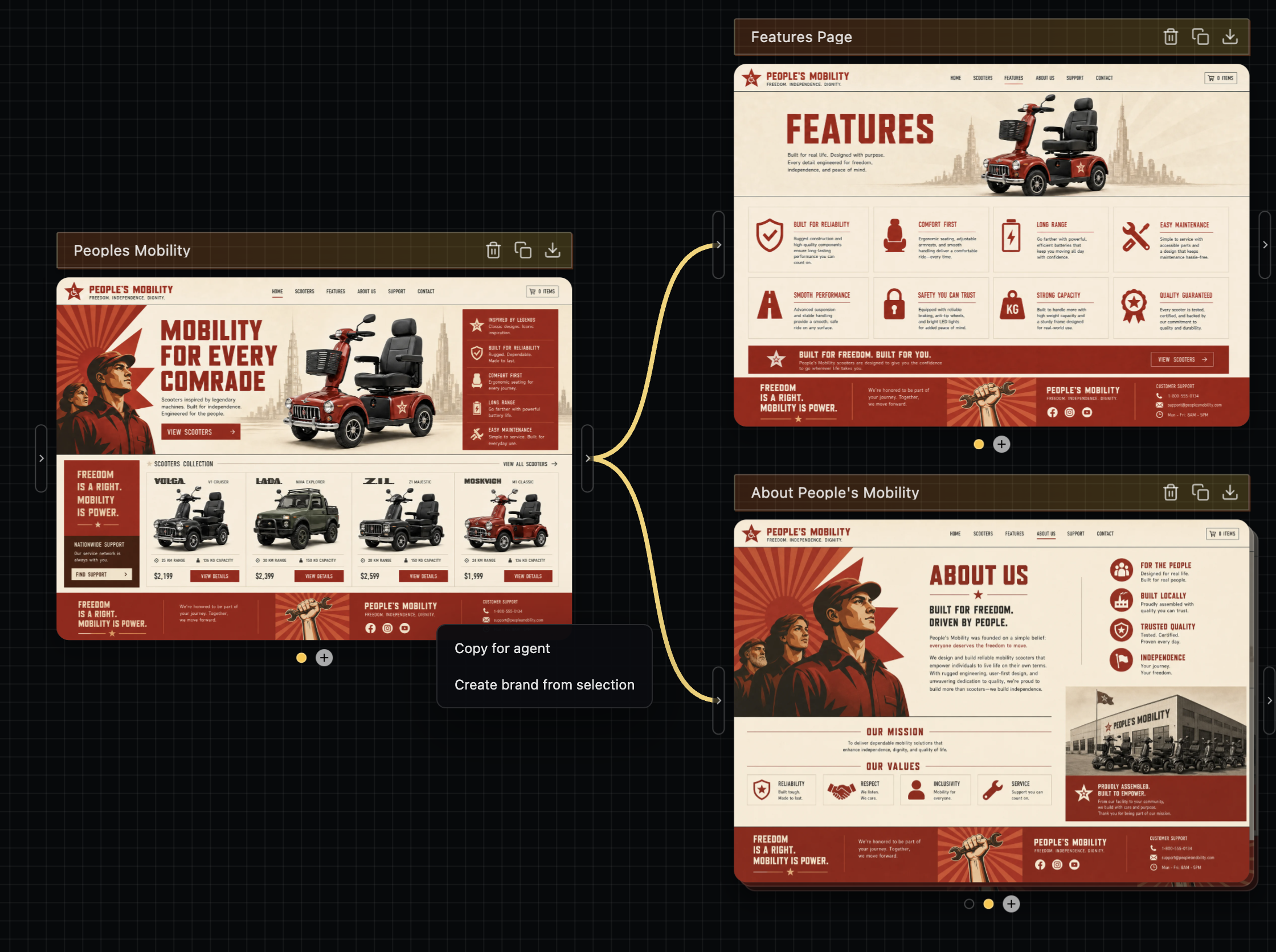
RE this one, I highly recommend doing image->code as the flow here. Codex's sites feature is doing this under the hood - it's rendering an image first with gpt-image-2, then building from it as a reference.

You can use gpt-image-2 directly for this, though if I can plug my own stuff diffui.ai it's exactly what I made this for. It'll make it easier to do multi-page flows with the same style easily, then you can hand off the designs to your agent, ie https://image.non.io/6e1f98ad-4c79-4735-9932-b0d5cca9be98.we...


I use Claude Code, flow for reusable skills/prompts, and leaf for reading Markdown comfortably in the terminal.

- Claude Code

- flow: https://github.com/RivoLink/flow

- leaf: https://github.com/RivoLink/leaf

- GNOME Terminal

It's a pretty terminal-first workflow.


I'm a contractor (AWS and web apps), so I get a lot of sometimes-ambiguous requests. I have a five-part workflow via Claude/Codex skills: discovery->implementation planning->implementation->verification->review

Each phase writes to `./.agents/plans/{plan-name}/` in the project root. All in Markdown. That way, the flow is agent-agnostic. Each phase artifact is immutable after being written.

More details:

First, I put all the information that I have (documents, client statements, any code, my own summary, etc.) into a document. Which I pass to the discovery planning skill.

The discovery phase more formally defines the project in terms of functional requirements, non-functional requirements, constraints, risks, and assumptions. This might take a few passes to get everything nailed down.

After that, I being a implementation planning phase using the discovery artifact (`discovery.md`). We define the work in terms of phases, where each phases has various tasks associated with it (all checkboxes). Again, usually requires a few passes.

After that, I have a clear idea of the work needed and can send an estimate to the client. Or, if it's a personal project, get started actually building it. I have another phase for actual implementation.

Verification and review are similarly defined. They can be done by any agent.


All I use is codex right now.

I brainstorm with it, create documentation, and generate code. Then review, test and profit.


Claude Code, Codex, Pi clis all for varying levels of work. VS Code when needed.

I review agent messages, some specs/plans, and conduct local code reviews with Plannotator [1].

For skills, I have a bunch of custom ones for my own workflow. and for public skills I really only use the interrogate skill from cursor's lauren [2].

Key workflow stuff:

- Almost all work I do gets done in a git worktree.

- ghostty + Mac OS gives me all the organization I need for multi-agenting

- turn off all agent memory, this has only ever caused problems for me.

[1] https://plannotator.ai

[2] https://github.com/cursor/plugins/blob/main/pstack/skills/in...


I would not try to mix newbies in with experienced software developers.

Pick one audience at a time and approach it that way.

For a newbie, something like Replit free tier might be the way as there is little cognitive overhead to getting setup.

For a experienced developer, having them get a $20 sub and work on one of the popular agent harness.


MacOS, Ghostty, Tmux, Neovim, Workmux[1], OpenCode/Claude Code, and lots of markdowns.

1 - https://github.com/raine/workmux


Throw tmux in and this is my exact setup as well. I'm looking into finding ways to orchestrate entire workflows across multiple agents in a harness-agnostic way (locally at first).

I forgot to say, I use Tmux + Workmux

https://github.com/raine/workmux


Maybe you're interested in https://github.com/RivoLink/leaf. If so, I'd appreciate your feedback.

There's lots of ways. You have to upskill through the stages IMO. Write code, write w/ agent, write w/ multi agents, write w/orchestrators.

My way is to just run a giant AI agent factory engine and make the agents full flow do everything. (plan long term, write prd, task, review).

Here's ~4000 commits in last month as an example, i have about ~10k ish including private/work stuff? https://github.com/portpowered/you-agent-factory/commits/mai...

The premise when you get to full automation generally is you go full industral engineering:

1. watch overall flow, improve process via continuous improvement

2. work via checklists and gates.

3. replace process with mechanisms as much as possible (code > agents)

4. optimal throughput is continual testing and iteration (CI, CD), coverage, full e2e tests, mock everything, general best practices really.

decent blog: https://openai.com/index/harness-engineering/

general points:

- build lots of linters

- document literally everything (arch, prd, best practices in repo)

- too many agents at the same time makes lots of code conflicts, so need to consider architecture of code how to maximize concurrency.


Genuinely curious - in your case, where do the requirements for what needs to be built come from?

In every project I've touched, business requirements are always the bottleneck - so I've never been able to wrap my head around what kind of requirements can be fed into a setup like this at high enough volume to justify it.


Have you been able to build anything substantial with AI factory itself? I have done some of these experiments myself on these sort of things and found they ended up often being less effective than using the latest tools in harnesses like claude code.

But curious if you've found it to be a big unlock. I have been doing some of this industrial engineering myself.


At the moment I predominantly work with Python and hence PyCharm as the main IDE. However, I've built this plugin https://plugins.jetbrains.com/plugin/31117-agent-cli to render agentic CLIs as an editor tab in PyCharm and also some notification hooks so I don't have to switch windows and it's easy to jump around the code while the agent is doing its work.

Besides that I have a collection of custom skills (plan for JIRA tickets, github PR creation, code review, etc), a set of MCPs (most are for internal tooling) and most of the time I use Claude Code.


Thanks man, I was looking for something like this for a while!

Ghostty with Claude Code. That's pretty much it.

For each new feature, I open a worktree, spar with Claude to work up a gherkin spec with @todo on each story. Each agent pushes commits to a WIP PR in GitHub where I review and leave comments or questions. Once the spec is done we mainly interact on the PR. @todo becomes @wip and @done as the agent progresses. I really like gherkin for agentic engineering, it's very clarifying.

I have about 2-4 agents running at a time. Large test suite, linters and formatters enforced on push.


same

I banged out a simple FastAPI endpoint/tool (along with dockerization and deployment) and a media-heavy Astro website (along with Cloudflare Pages publishing) in Google's Antigravity2.

https://antigravity.google/product/antigravity-2

Not really a recommendation since I don't have a good benchmark of these tools but Antigravity's /grill-me feature where it asks you a bunch of questions like a system/business analyst and gives you an implementation plan for review (and can actually change it further) is pretty cool and it is certainly fit for what you intend.

Heard also good things about Zed and am testing it right now. So far I managed to... edit a json.

https://zed.dev/


Recently ditched VSCODE completely and switched from development on local machine to remote "vps" cloud.

Currrent setup:

Zed + Terminal threads (love this!) + Remote machine

Devcontainers + Claude + Pi

[1] Zed https://zed.dev/

[2] Terminal threads https://zed.dev/blog/terminal-threads

[3] Pi https://pi.dev/

As sort of byproduct also replaced Alacritty + Zellij (i just don't have the need to use more, 3 weeks of new setup)


I've spent 2 weeks (2-4h per day) to make D language[1] version of Sciter SDK [2]

Choice of AI "tooling" was by accident - typed something like "how to define copy constructor in D for custom structure" in Microsoft's Copilot in Edge browser that gives context for AI.

The answer was good enough for me and so I went with it further.

[1] D language HQ : https://dlang.org/

[2] AI-Assisted Development with D Language, Creating Sciter SDK: https://terrainformatica.com/2026/06/05/ai-assisted-developm...


I type in a text box and tell the AI wat to do. Yea my tooling is just a text box. Like Google search is just a text box.

Opencode & mixed LLMs

1) Write half pager of markdown by hand - tech, architecture, features

2) Ask 2-3 LLMs from different companies to review for gaps & problems

3) Make LLM turn it into implementation plan with emphasis on modular phases

4) Repeat step 2 but on the implementation plan. Usually the 3rd LLM just goes yeah that looks fine

5) Walk through phases individually, sometimes multiple in one shot depending on vibes. Sprinkle more 2-3 other LLM checks in between again depending on vibes & judged difficulty


My usual workflow is GPT-5.5 for planning, DeepSeek V4 Flash for milestones implementation, then GPT-5.5 again for review. It has worked pretty well so far.

I like Zed...

but AI dev workflows get complicated fast

you start with claude code or codex and it's cute, but then you realize - hmm configuration is cheap, the AI can do it!

then you start looking into MCPs and skills, fuck it, oh-my-pi looks awesome!

wait a second? I can just have AI make my own personal AI harness! Next thing you know, you're writing the 5th version of "little-coder" or similar using the Pi library

ahh shit, you just read an article that `tools` are actually crazy important for AIs, using `sed` is dumb when `hashline` + ASTs are way better, lets just start writing our own tools!!

...anyway I just use Zed, simple agent on the left, code on the right

i have some pretty complicated automated workflows that use `linear` + a orchestrator -> implementer -> reviewer -> releaser workflow, but it's less a dev stack and an AI factory


DeepSeek and Mecha-AI as CLI coding agent for general architecture [1]

Sublime Text and a DeepSeek plugin for file by file cosmetic fixes

Nothing else. With these tools I am building apps like never before in minutes instead of months

[1] https://www.npmjs.com/package/mecha-ai


I wrote my own tooling around the raw LLMs:

I can tick files in Vim, those get concatenated into a prompt. Along with a feature request. Plus an instructions file that tells the LLM how to reply. Plus my general "rules for good code" file, plus one "rules for good code" file per language involved, plus a project specific overview file. The LLM then answers with a list of changes it wants to make to the code. My tooling then applies those changes and I look at them via "git diff". If I like it, I commit. If not, I change one of the prompts and start the process again.

Instead of replying with code changes, the LLM can also decide to request more files. I wrote a little DSL for that.

I described the beginnings of this workflow last July:

https://www.gibney.org/prompt_coding

Feels like an eternity ago. I think I will write a new blog post this July and describe how the workflow has evolved over the past year.


Something different that other folks might not have thought of: Robust multi-environment infra deploy scripts that leverage terraform + AWS SSO

I've found that converting stuff that's previously been very ops-cli heavy into very detailed skills has worked really really well.

I use Claude Opus 4.8 + Conductor as my daily driver


I did a similar workshop between Feb-April (1 hour zoom call on Wednesday, 3 hour hands-on in person every week)

Most of the participants has Windows laptop. (Except one with Mac)

We had suggested Linux on WSL2 and VSCode. (`uv` for python package management)

But realized that we were spending a LOT of time fighting the tools/combination. WSL2 + Windows filesystem + uv did not work well together.

For person with macOS - it was smooth sailing

If I do another batch, we'll use native `pip` and python (not uv) and I think then we won't need WSL2


Stanford University offered the course "CS146S: The Modern Software Developer" in Fall 2025. Check it out if interested. https://themodernsoftware.dev/

What is your impression of the course?

Lead Dev for a Security Company with a very strict AI policy.

Mostly Hand coded, using an agent in the browser (Claude / Corporate ChatGPT account) when necessary. I am aware we will fall behind using this methodology and have advocated for change, but I suppose it comes with the territory.


I don't think it's clear you'll fall behind. Your competitors could very well be vibe coding themselves into messes they will never recover from.

virgin project:

1/ spec driven dev (https://github.com/github/spec-kit)

2/ then degrade to multiple sessions (no worktrees) debugging various problems until its done

On UI Design (MacOS, Web):

1/ AI does a first pass. Try to give it style guidance on my own (colors, style, etc).

2/ Prompt ChatGPT.com with screenshots and ask for recommendations on how to make it better.

3/ Codex the changes (with minor edits)

4/ loop 2-3, ask Gemini for feedback too


I have a vibe coded script which creates a git worktree + zellij pane with a specific layout + a virtualenv per feature. "tmuxinator" style.

The zellij layout includes panes for OpenCode, a shell, a neovim, inotify tests, etc.

I cycle through the zellij sessions during agent prefills.


Self made TUI that just lists LXC containers.

I have a base container.

"A" to make a new instance.

Pi.dev when I hit enter on any container. Hot swap anthropic enterprise and openai and openrouter as needed.

Every container has the dev env already running for my current projects. Iterate, rarely use vim when needed, spec driven and have llm draft prs for me then I review.

I know the codebase in and out so what I want done is on bypass mode and then I review closer at the draft PR step before marking ready for the team.


So many random methods and tools - so much time wasted.

Don't want to jeopardize this awesome chat about tools but for AI workshops I think these visual cards I came across could be an amazing way to handout. They cover all LLM concepts and explained visually. Found very useful to revise LLM concepts before AI research scientist/AI engineer interviews.

https://github.com/llmsresearch/llm-flashcards


"these visual cards I came across"

You came across them in your own repo and company that sells them?


Thanks for spotting it but if I tried other way would have kicked out, it was a genuine try to help but thanks @mellosouls I can understand.

Claude code + very opinionated type script. Try to push as much as possible as far left in the SDLF (types -> lint rules -> tests -> md) and try to improve the dev ex after every single PR.

If you are teaching newbies, just get them into the Claude Code or Codex desktop apps.

For devs:

Claude, Codex and Cursor. All on the $20 subscription.

Then use Conductor for worktrees w/ Claude/Codex for mid-size tasks and code review.

Cursor for manual or small changes w/ Composer 2.5.


I am like you were late to the AI party, and still find it hard to give up on coding and let the AI do everything, however i learned to trust the AI a little in the past few months.

Claude Code and/or Codex from Ghostty/Terminal. You don't need to complicate it.

a tmux session where every window is a claude code instance in a different checkout of the repo

and then an MCP+Channels system that let’s the claudes DM each other

plus the Telegram channel so one of the claudes can talk to me over text message


I use VSCode, Claude Opus 4.7, github work trees to work on multiple projects. At most I work on 3 projects a day. More than that and I start hallucinating myself.

Wrote up my approach recently in a blog post:

- https://blog.isquaredsoftware.com/2026/05/ai-thoughts-part-2...

TLDR:

OpenCode + CodeNomad web UI, Opus 4.6, bunch of customized plugins and some codebase indexing MCPs, a separate `dev-plans` repo for generated project docs and artifacts, and a personal workflow where I stay very hands-on directing the work.

also I wrote a lengthy post detailing my emotional and mental journey from "I will _never_ use AI to write code" to actively using it, as well as my opinions on where we stand now and whether this is actually any good or not:

- https://blog.isquaredsoftware.com/2026/05/ai-thoughts-part-1...


MacOS, Ghostty, Neovim, Pi (with a fair bit of customization to each). I'm relatively new to Pi after using Codex pretty heavily, but it's nice to be able to customize things to how I want.

ChatGPT, request minimal necessary diff to make a specific change, review, ctrl+c, ctrl+v

Currently using Arch Linux with VsCode and as server, I am currently going for vercel for no cost.

1) OpenCode. Despite its many shortcomings and constant bugs, it's good enough for basic work. Use the web interface so you can switch around sessions easily, keep it running in the background (on a VPS for example). Add to it MCP servers for other systems you use, like AWS Docs MCP, Atlassian MCP, Linear MCP, SearXNG MCP, Playwright MCP, etc, which basically multiplies the AI's usefulness. Tune config to block all use of /tmp/ because the AGENTS.md instructions to not use that dir are always ignored. Set API tokens in env vars for most services and modern AI models will figure out how to use them (cli, api, etc).

2) OpenCode Go subscription, backstopped by Chutes Plus subscription, OpenRouter with $10 in credit (for very rare use of SOTA models), and various free providers (options: https://codeberg.org/mutablecc/calculate-ai-cost/src/branch/...). I almost never run out of the OpenCode Go subscription so I'm not a heavy user. Use Kimi K2.6 or GLM 5.1 to develop plans or do complex work, DeepSeek V4 Pro for simpler planning or less complex work, DeepSeek V4 Flash for implementing plans or doing simple tasks.

3) Some kind of 'ticketing' system for the AI. At work we use Linear, at home I tried Beads but I didn't like how bloated it got, so I made my own (https://codeberg.org/mutablecc/dingles). Important to have a way to plan work, persist the plan, and work on each item til they're done. In general you're going to use your AI coding agent's Plan Mode to first build a plan around anything you do, and tell it to ask you questions to align on the solution and use question-asking tools for convenience. Then when the plan is correct, have it make all the tickets. If your context window is nearing halfway full, start a new session to begin working on the tickets, and have it commit and close them as it goes.

4) Craft an AGENTS.md (or find somebody else's) that explicitly uses TDD to craft tests. You write the test first, and verify it looks like it will actually check for the expected results; do not continue until your tests look valid to you, the human. Commit them when they look good. Then have the agent write the code to make the tests pass. If you don't do this, it will churn out tests that pass but don't actually identify when things break. You also need end-to-end tests to actually run the app and verify it works, via Playwright, screenshots, running CLIs in Docker containers, etc. This is much harder to do correctly than just generate seemingly-working code.

5) OpenCode does a decent job at balance between not asking you for permissions, and gating things outside the repo. But it's not really "safe". Your best bet is to run a VM (colima) with Docker container (Ubuntu) and run all your AI stuff in the container. This way you can use "yolo mode" to have the AI churn without you and the only thing it can destroy is the Git repos you volume-mount into the VM & Docker container. (I have some of that setup in code here: https://codeberg.org/mutablecc/ai-agent-coding)

6) If you start letting the AI do remote things (like manage remote Git repo, push, make PRs, etc) it is more likely it will do something destructive (like force-push Git repos with destructive changes, create/destroy cloud resources, SSH into boxes and destroy those boxes, etc). So be very careful not to instruct the AI to do anything remote, unless you have set up read-only credentials for the AI, and it can't somehow gain access to the read-write credentials. This is another reason VMs/Docker are good, you can make sure to only volume-mount the credentials you want it to have access to.

7) There is a full walkthrough of AI coding here that is very thorough and battle-tested (https://www.youtube.com/watch?v=-QFHIoCo-Ko). Watch the whole thing (yes it's long) to save yourself a lot of trial-and-error later.


My stack is really boring, just VSCode + Ghostty and Claude Code team plan (premium seat).

this is basically what i use, it works just fine. I use iterm2 instead of ghostty.

Codex pretty much the only tool I use now

I feel it’s important that this should be mentioned at least once in a thread like this: none. I choose to program the old-fashioned way, and do not anticipate this changing in the foreseeable future, and believe that I’ll cope just fine in my niche; and if it becomes commercially unviable, well, I may no longer be interested in the field anyway.

I won’t go into any details on why here, because that would make it too much about me. There have been plenty of discussions of reasons, trade-offs, &c. Plenty of people are rejecting this stuff, for a wide variety of reasons.

But one thing I will say: if I were teaching someone to program, I would actively discourage them entirely from using AI stuff, even though it will seem to help. (I mean someone that wants to learn programming, not someone that just wants results and is not interested in programming as such.)


Cool!

This thread is meant for people who use AI, though.


I use OpenCode with a three agent combo (architect, developer, reviewer), as I've found it's crucial that different models write the code vs review it.

More details here:

https://www.stavros.io/posts/how-i-write-software-with-llms/


I am working on a project/essay/thoughtsphere that is beautifully illustrated by this thread. My project is to help automatically take your patches/workflows and package and rebase on top of upstream using quilt so I can get the latest greatest fixes while keeping my notafork. Forks are expensive, patches are easy.

That I think we're going to see much much more variation in design, software and interfaces as the labor to produce them become trivial. Everyone can patch software to do what they want. Yesterday I had claude rewrite xrdp to allow me to remote into my desktop session without having to deal with x11vnc, it lets me drop in, pick :0 or :1, auth's with PAM and gets me in. What I have always wanted with xrdp that never worked quite right. I have patches for i3, and for vim, and for xpdf, and bash, and mocp, and all sorts of tools and scripts I wrote.

Anyway, here's the site essay I am working up but yeah:

Right now, programming is rapidly becoming not expert work. Soon we could all be running (i think this unironically) practically our own distros if we want. Total customization of the stack.

I really feel that one positive thing AI can do is drive labor costs down enough to allow personal choice in the software we use. We have open source software, but it's channelized and controlled by a few companies who fund projects! That might change too!

AI can simply One Shot a lot of small problems i have. Like reading unfamiliar codebases, finding the relevant function, and writing the delta. The gap between "I want bash to do X" and "here's a patch" is shrinking fast. When that gap closes, a lot more people are going to start customizing their software - but we don't have a great wrapper for it yet.

The part that doesn't get easier is everything after. How many 'forks' exist on github but people havent had time to maintain, or worse, are being used in production with bugs? How much code have we lost out because of that? Do forks really help us? I don't know. Does everyone want to use shitlab? I don't know.

Building the package. Getting it on your machine or out to the fleet. Keeping it there when upstream ships a security fix.

That's an infrastructure problem, not an AI problem I needed a way to solve it now

________ is that little bit of software infrastructure i need . built now, for the world where i am right about my bet.


I'm a bit of a fanboy, but exe.dev + their Shelley web agent is pretty great

Why do you like exe.dev over other providers? Just curious, I haven't tried any yet but I am interested.

Up to 50 VMs with your shared resource pool for $20/mo, just all their unique features like http integrations and Shelley of course is just native, their exeuntu image has everything you need. Build with Shelley, no need to deploy it's already on the VM (tell Shelley to setup systemd to "productionize" it) with a my-vm.exe.xyz url with auto-https via exe's https proxy where you can keep it private to your exe login or make it public (no auth through the exe https proxy).

I'd say try it out you won't be disappointed.


So, you don’t have any experience in it but want to run a workshop?

Hubris is one of the 3 most important qualities of a good programmer.

OpenCode + their Go subscription.

Start with a nice batteries included setup, read anthropic's knowledge share, play and iterate, stay human in the loop.

Check out Dax Raad (behind OC) on the Pragmatic Engineer podcast, I think you will like his philosophies, I sure do.


One is the sword (claude code) one is the shield (codex)

Tldr; just teach them to talk to Codex and show Pi to ambitious ones.

Raw Codex, both app and cli. On windows 11 which is horrible (sometimes in WSL, which sometimes crashes for no reason when I copy a lot of data around and somehow reverts contents of a mounted vhd virtual drive to previous state from long ago, after a crash). I'd love to switch to linux but I'm an avid gamer. I installed a linux on my old box though and some of my AI jobs run there. GPU there is two generations back but it still has 24GB of VRAM.

Bare Pi if I have a cool idea on how to extend the harness. I don't use any skill in Codex but I ask to create some for Pi to go with the extension for Pi I am building at any given moment.

I used to have a kanban skill for Codex (and others) to build large amount of features afk in a spec driven development manner, but recently Codex is doing fine without it. And the last time I used kanban it built diligently a completely wrong thing that I, it turned out, underspecified.

Zed if I'm really inclined to view any files. But basically it's my text file viewer because it's marginally faster than the modern Notepad.

About 5 different web browsers, because they all suck. All crammed with tabs going back months.

Language, whatever. I bounce around between Python, Rust, C#, TypeScript. Maybe I should try something exotic.

Gpt-5.5 xtra high, Glm-5.1 (not recently because it's not as good, I used to like Kilocode with it, in previous major version 5(?), most recent Kilocode is streamlined into mediocrity, although you can still intall old version). Gemma4 on local ollama for specific non-coding tasks. Openai api proxy connected to my Codex sub, for cases where Gemma4 doesn't do that well.

I'm having immense fun by making programs for ad hoc tasks like transcribing a conversation I had this morning in a language I barely know. Or extending my old program that searches proofs in domain of axiomtic logic. Or adding feature to a charting "app" I built few years ago I was too lazy to add back then. Those 3 I did just today.

I can conclude that Gpt-5.5 is a better developer than I ever was or even could ever be (in all aspects) after being a programmer for two decades and being considered pretty good by my peers.

When I need a prompt for something, I ask codex to write it. If results are unsatisfactory I ask it to tweak it. It works very well.

I do image generation with chatgpt-image-2 although I think I'll need to build some tooling around it at some point, like a basic photoshop, mostly LLM controlled.

Sometimes I go to chat.com and ask for deep research on some subject an put the result in my project dir for Codex to find and learn from.

I don't use skills or MCPs. I always --yolo.

I release nothing. Even if I build something that might have wider appeal, I firmly believe that anyone could build it as well. And effort needed to find what I built and check if it fits somebody's need exceeds the effort they would need to extend to build it themselves exaclty as they want it.

All I do is mostly for my own amusement. I have as much fun with it as with playing games. Possibly even more.


I’m already doing this with my school (givedirection.com) and you’re gonna have a hard time nailing this down because there’s no two similar set ups

Especially along the range of newbie to expert it’s extremely variable and you’re not gonna be able to pick one that rules them all

I would suggest you revamp your approach and have different courses for different types of people I had to split my course into a basic and an advanced and they are extremely different

Even within the advanced course fairly simple stuff like hosting your own LLMs seems to really be a stretch for a lot of people


The simplest mainstream options for tools:

1) Claude Desktop which includes Claude Code for Anthropic: https://claude.com/product/claude-code (alternatively the terminal based version; either way get the subscription)

2) Codex for OpenAI: https://developers.openai.com/codex/app (same as above, subscription preferred instead of paying per token)

3) OpenCode for a variety of models: https://opencode.ai/ (they also have a subscription, but this in particular also makes it really easy to connect to OpenRouter)

4) KiloCode is essentially the above, but for VSC derived editors: https://kilo.ai/ (I personally liked RooCode more, but that got retired)

More niche tooling options:

1) Zed is pretty good, though I saw some issues with their LSP Edits and found that connecting them to OpenCode through ACP worked better, still a cool editor: https://zed.dev/

2) If you have to pay for tokens and can't get subscriptions, look at DeepSeek as a provider (V4 Pro with Max reasoning): https://api-docs.deepseek.com/quick_start/pricing

3) I'm also writing a launcher to make running Claude Code with 3rd party providers earlier, early days still: https://ccode.kronis.dev/

Note: for anyone on Windows, if you install the terminal versions of the tools (Claude Code, Codex, OpenCode, ...), you probably want them inside of WSL so there's less confusion with file paths etc. that some models have.

In regards to actually using the tech:

  - version control and maybe worktrees
  - sub-agents are pretty nice to have, Claude Code also introduced support for longer running workflows
  - throw as much tooling as possible at the project, like Oxlint, Oxfmt etc., for Python it might be Ruff and ty or Pyright or whatever
  - throw as much testing as possible at the project, maybe require certain coverage or just have CLAUDE.md that nudges the models to write and run tests
  - throw as many additional scripts at the project as you want, e.g. how you want the architecture to be laid out, max file length limits etc., whatever common tools don't cover
  - some tools also support LSP, use those when possible
  - pretty much all models will still output slop, though making fresh instances (even of the same model) review its output, e.g. 3 parallel sub-agents looking for critical/serious issues works pretty well, I just have a review loop that I make the models run before commits
  - ideally you'd also test local instances of whatever you build (e.g. real PostgreSQL instance etc.), just so the dev loops are tighter and faster


Guidelines | FAQ | Lists | API | Security | Legal | Apply to YC | Contact

Search: